
Vintage LoopShopify and WooCommerce migration for a second-hand luxury bag boutique
A WooCommerce-to-Shopify migration for a second-hand luxury boutique, bringing together catalog, images and customer data with targeted checks and theme refinements.
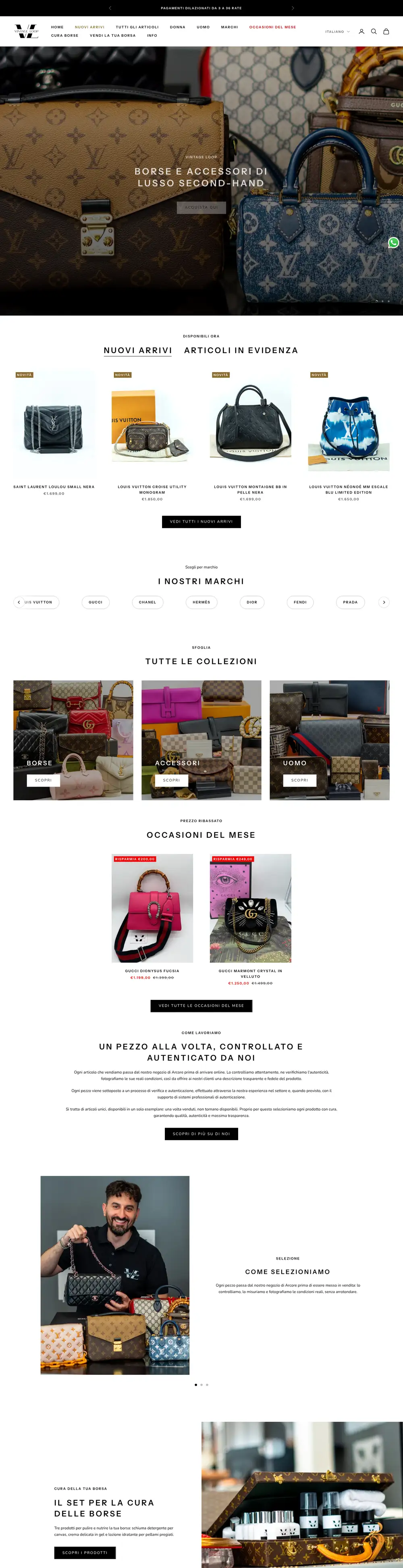

The project at a glance
- Built from scratchNew Shopify site for a second-hand luxury bag boutique.
- MigrationCatalog moved from WooCommerce to Shopify.
- Online storeSite published and live.
- Technical PartnerTechnical Partner service being activated, after the post-launch work.
Starting point
Vintage Loop sells second-hand luxury bags and accessories, often as one-off pieces. The project involved moving from WooCommerce to Shopify and building a new storefront.
The transfer called for careful handling of product information, photographs and customer data, while keeping the verification of individual batches distinct from the project as a whole.
Moving one-off products and images without losing context
For a catalog of unique items, images, price and availability need to remain associated with the correct product. Existing matches must also be identified to avoid duplicates.
Differences between source records and Shopify data call for checks and exception handling, rather than a blind import.
From WooCommerce to Shopify
The migration accompanied the new storefront build and data transfer, with separate checks for catalog, media and customer records.
The starting point
- Catalog and data on WooCommerce
- Unique products with photo galleries
- A new Shopify experience to build
The Shopify work
- New Shopify storefront
- Transfers and checks in batches
- Subsequent theme refinements
The work
Controlled import
In one documented October batch, 27 products were created as drafts, retaining descriptions, prices, inventory and source references. Two existing matches were excluded for separate review.
Images and variants
For that batch, 324 product-to-image associations were checked and gallery order preserved. The source products were simple: no color or size variants were invented.
Customer data
The customer-record migration included matching and duplicate checks, distinguishing registered customers from contacts derived from guest orders.
Theme refinements
Sections pairing images with text were adjusted to handle different proportions; the changes were tested on a copy of the theme.
The result
The project delivered a Shopify storefront and verified transfers of catalog and customer records. The batch figures refer to one documented operation, not the entire catalog.
The technical value lies in data reconciliation, exception handling and verification of product-to-image associations.
A migration is checked in parts
Catalog, images and customer records have different requirements. Documenting each batch and checking exceptions makes the transition easier to understand and manage.
No client financial data is published, nor commercial results attributed to a single intervention.
Related services
Need to migrate your catalog to Shopify?
The move from WooCommerce to Shopify can be followed from the build of the site to the later refinements. For a conversation, a direct contact by WhatsApp, email or phone is enough.
Learn more